I didn’t have the productive week I was hoping for on KA but all in all, it wasn’t too bad. I got through what felt like a lot of material but, in aggregate, it only ended up being about one unit of work. I finished off Unit 3, Simulating Phenomena with Loops, and got about halfway through Unit 4, Playing Games with Functions, which isn’t that much, but I’m guessing I spent close to 10 hours on KA, plus another ~10 hours watching CS50 vids, reading, and watching other little videos about CS. So, although I’m disappointed I didn’t make it through Unit 4 (which would have gotten me back to the 1-unit-per-week pace I was hoping to have), I’m still happy with the amount of effort I put in, so I’ve got that going for me which is nice. 😬
I started this week reading an article from the fourth lesson of Unit 3 titled Compound Loop Conditionals:
Unit 3 – Simulating Phenomena with Loops
Lesson 4 – Loop Control Flow
Article – Compound Loop Conditionals


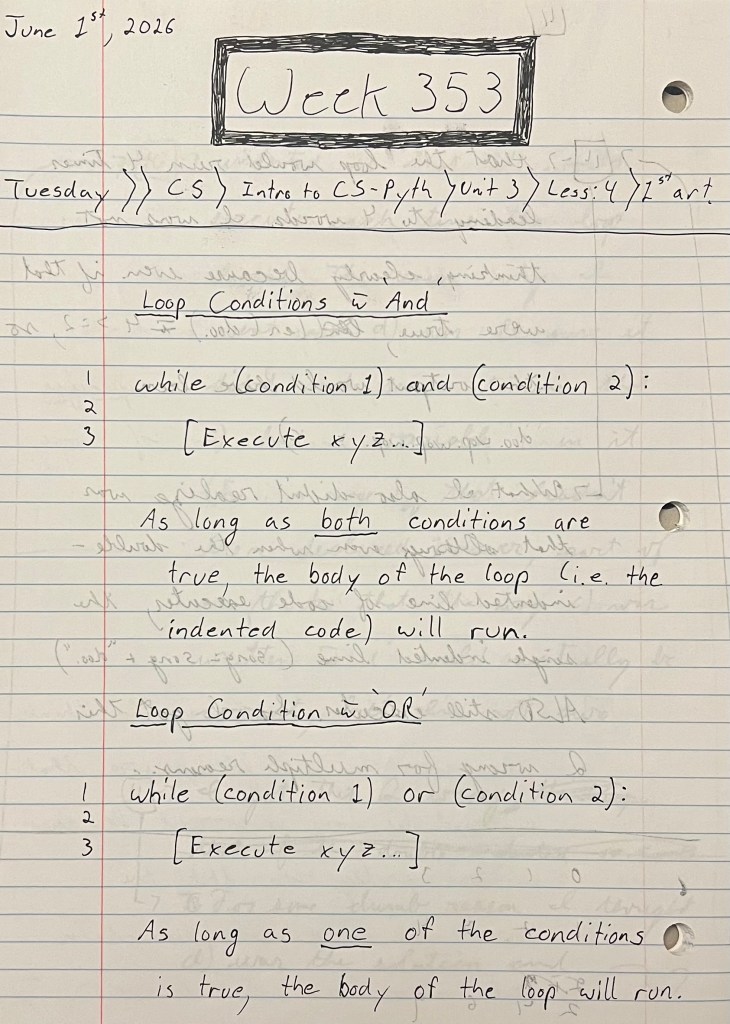
This article talked about setting up a conditional with multiple conditions using the AND and OR operators. In essence, when using the AND operator (ex. if (condition_1) and (condition_2): [code]), the loop repeats only while BOTH conditions evaluate to True. It terminates if at least one condition evaluates to False. When using the OR operator (ex. if (condition_1) or (condition_2): [code]), the loop repeats while at least ONE condition evaluates to True. It only terminates if both conditions evaluate to False.
After that article, I then made notes on the second video from that lesson:
Video – Break and Continue


This video talked about using “break” and “continue” which are both used inside a conditional. ‘Break’ means, “if Boolean = True, stop the loop entirely.” ‘Continue’ means, “if Boolean = True, go back to the top of the loop and restart loop (and don’t execute any code below the ‘continue’ in the loop body).”
Exercise – Trace Break and Continue Statements
Question 1


Question 2


This exercise took me a bit of time to work through, not because using the ‘break’ and ‘continue’ statements — or operators? I’m not sure — were difficult but because reading the code and making sense of it and what the questions were asking me to do was sometimes hard.
The next thing I did was the challenge from that lesson:
Challenge – Infectious Diseases


This challenge was pretty hard for me to figure out/work through even though each step only required me to write like three lines of code… 🫤 I don’t really know how I figured out the first step (shown in the third screenshot above) of “calling” virus.recover(infected). When I look at what was in the virus module (second screenshot above), the part that says def recover(…) doesn’t include the variable infected, so I don’t know how I knew to add infected in as an argument in step 1… After getting through the first step, steps 2 and 3 were much easier and I more-or-less understood/understand how the code works for each step, but they did both take me 5–10 minutes to think through before I knew what code to use and where to put it.
As usual, the final thing I had to do in that unit was the end-of-unit project which was pretty tough. I had to work on it, then take a break, and then repeat a few times before I got through the whole thing:
Lesson 5 – Simulating Populations
Project – Natural Selection


Although this project was difficult, it helped me learn a LOT. (Actually, probably the right way to say that would be because this project was difficult, it helped me learn a lot. 🤯) I put the full instructions — which aren’t shown in the screenshots above — into CGPT so it could help me make sense of what I was being asked to do and it gave me the instructions you see in the second screenshot above. KA also gave an example in the IDE using big vs small Neeblers — also not shown in the screenshots — so I used that as a reference, as well. Even still, I found using loops and switching between variables VERY confusing. I got CGPT to act as a tutor and it didn’t tell me the answer but bread-crumbed me through each step which made things easier. (I genuinely think helped me learn faster than I otherwise would have.) There were a lot of tricky parts, but the hardest thing was figuring out how to get the program to state “0 slow Neeblers”; “Slow Neeblers have become extinct. :(“ and then quit printing out “0 slow Neeblers” for each successive generation. Without going into the details, I had to come up with an extinct variable and also wrap the slow Neebler print statement in two conditionals (shown at the bottom of the first screenshot). This helped me learn how variables and loops work more than anything I did this week, but it was SUPER frustrating.
After that, on Friday I got started on the fourth unit:
Unit 4 – Playing Games with Functions
Lesson 1 – Function Definitions
Video – Functions


This video introduced the idea of functions which are written as:
- def function_name(argument(s))
In the example Kim gave, a player in a game is asked what colour potion they want to drink. This input is put into the function drink_potion as the argument which output an integer (purple == +10, pink == +4, and green == –2) which, in her example, is returned as the variable health_change. In the game, she then adds health = health + health_change.
The next thing I made notes on was the exercise from that first lesson:
Exercise – Interpret Function Definitions
Question 3


Question 4


This exercise was pretty simple, although I did have to read each question a few times to understand each function. That said, as I worked through each question, I could tell that I was/am getting better at quickly interpreting the code and switching variables and values back and forth in my mind. 💪🏼
After that, I got started on the challenge from that lesson:
Challenge – Trophy Case


This challenge wasn’t too hard, but I did get stuck on the first step. I couldn’t understand that I needed to switch the first print statement from print(trophy_name) to print(get_time_trophy(hours_played)). I thought that since the function returned trophy_name that the variable inside the OG print statement would automatically update with the returned value for trophy_name, but you have to print the function which actually prints the returned variable. After that, the other two steps were pretty easy and took me ~1 minute each.
Lesson 2 – Function Control Flow
Video – Local and Global Scope

In this video, Kim talks about variables being in what’s called “global” or “local” scope. Variables (and functions?) that are declared at the top of a program are considered global scope, meaning the program/computer can call them anytime. Variables that are inside the body of a defined function are local scope, meaning the program/computer will only call them when executing the function. (I think… I believe this all had to do with the computer’s memory, but I could be wrong.)
After that, I then watched a video on function control flow:
Video – Nested Function Calls

This video talked about what’s called “nesting function calls”. The essence of it is that you can simply put functions inside of other functions. Kim went on to do an example which I found a bit confusing, but her point was that there are definitely times when doing this makes your life as a programmer much easier.
The last thing I got to this week was the exercise from this lesson:
Exercise – Trace Function Calls
Question 5


Question 6


This exercise wasn’t too hard, although I did have to read each question a few times with each one taking me ~2 minutes. The first question shows how you can use one function inside another — in a really complicated way of calculating someone’s hours… — and the second question shows how a function can call a global variable as it’s argument, which you can see in the second print statement.
And that was it for this week. Like I said, overall I don’t think I did too badly even though I didn’t make it through that second unit. For the past three weeks, I’ve been working at my job more than usual so I haven’t had nearly as much time to put into KA and CS, but I’ll be back to my usual schedule this week and for the foreseeable future so I’ll have much more time to put into studying. Plus, I think my spring allergies have FINALLY gone away — today was the first day where I woke up and didn’t have to blow my nose 7,000 times 🤧 — so, between that and not working as much, I’m optimistic that I might be able to get through Unit 4 and Unit 5 this coming week. It turns out that getting through lesson is taking me longer and is harder than I thought it would be, so it’s certainly possible I don’t make it through both units, but I think I have a chance! So, as always, fingers crossed I can have a solidly productive week and get back to the 1-unit-per-week pace I was hoping to have! 🤞🏼